Be Husky Safe
Wherever you are, be aware and connected.
Husky Safe is Northeastern University’s official safety app for students, faculty, and staff across our global campus network.
Emergencies and safety questions can happen anywhere. Husky Safe helps you quickly find emergency contacts, campus-specific safety resources, and 24/7 safety support in one easy place—so you can stay connected wherever you are in the Northeastern campus system.
Learn more about Husky Safe.
Visiting Northeastern? Use Husky Safe guest access.
Start here: Download the Husky Safe app today.


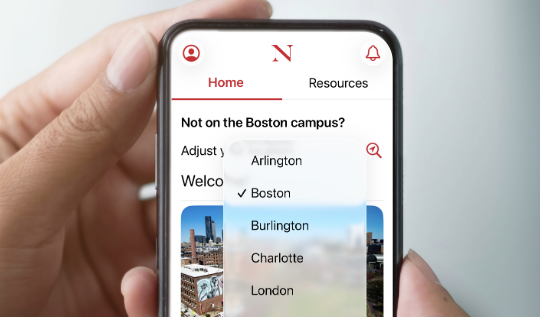
- Your location is automatically set based on your assigned campus—quickly access relevant, location-based safety resources.
- Change your location using the dropdown, or if you allow location services, tap the magnifying glass icon to automatically set your location.
Complete your safety setup.
Once you download the Husky Safe app, add SafeZone to complete your safety setup.
SafeZone: One tap to reach local emergency services.
With one tap, SafeZone connects you to Northeastern University Police or designated local emergency services. Don’t have it?
Be Husky Safe setup:
Being Husky Safe means being aware of what is happening around you and being connected to our Northeastern safety apps and resources.
Husky Safe: Be aware and connected
Quickly find campus-specific safety resources and 24/7 chat with safety support wherever you are in the Northeastern campus system.
SafeZone: One tap to reach local emergency services
One tap to connect directly to Northeastern University Police or designated local emergency services.
Are you a parent, family member, or visitor to Northeastern?
Use Husky Safe Guest Access
When you visit any Northeastern campus or you are helping someone else find safety information, you can use Husky Safe guest mode to access essential location-based safety resources.
How to download the Husky Safe app as a guest:
- Get Husky Safe in the Apple App Store or in the Google Play Store.
- Open the app and select the “Guest” button from the list of user options.
- The default location is set to “Boston.” Change your location using the dropdown, or if you allow location services, tap the magnifying glass icon to automatically set your location.

Why download Husky Safe?
Emergencies and safety questions can happen anywhere. Husky Safe helps you find the right resources fast, wherever you are in the Northeastern campus system.
With Husky Safe, you can:
- Call local emergency services, such as 911 or 999, with one tap.
- Connect with local campus security/police.
- Access campus-specific emergency contacts and safety resources.
- Chat with the Northeastern Public Safety to:
- Get non-emergency guidance
- Report suspicious activity
- Find helpful safety resources such as Northeastern emergency procedures, local emergency resources, safety tips, and fraud prevention information.
What you can do in the Husky Safe app
Get emergency help
From the Husky Safe home screen, get one-tap calling for 911 (or 999 internationally) to connect you directly with local emergency services based on your location.
Chat with safety support
For non-emergency situations, use the in-app chat to connect with Northeastern Public Safety.
- You can ask for safety guidance, report suspicious activity, or connect with security resources for your campus.
- If you need to stay quiet for safety reasons, chat may also be a helpful way to request assistance discreetly.
- Please note, there could be up to 30 second delay in refreshing newly received message
Find resources for your campus
Husky Safe will remember your selected Northeastern campus and show information that is relevant to that location. You can also change your campus manually.
Stay informed and prepared
The Resources section brings safety information together in one place, including emergency procedures, campus security resources, safety tips, scam and fraud information, local emergency resources, and campus maps. Some campuses may also include parking or shuttle information.
New features planned
Future Husky Safe releases will include travel and mobility safety resources as well as training videos and safety tips for your campus location.
Yes. Husky Safe is free to download and use.
Students, faculty, staff, and visitors can use Husky Safe. Students, faculty, and staff sign in with Northeastern credentials. Visitors use guest mode on the app to access essential safety resources.
Yes, while both Husky Safe and SafeZone will connect you to emergency services, SafeZone automatically notifies campus security that you have requested assistance, if activated on any Northeastern campus.
- On the Boston Campus, SafeZone connects you directly to Northeastern University Police and responders will start moving to your location.
- Off-campus, SafeZone connects you directly to local emergency resources.
- On any Northeastern campus, SafeZone notifies campus security that you have requested assistance.
Yes. Husky Safe supports Northeastern’s global campus system and provides location-specific resources for all campuses.
No. You can access general safety information and emergency contacts from anywhere. When you are on or near a campus, location services can help show resources for that location.
- Use chat for non-emergency safety guidance, suspicious activity reports, or connect with campus security.
- If you’re in a situation where you need to remain silent for your own safety, the chat can also be used to alert security or request assistance discreetly.
- Upon activating the chat, you will be requested by Public Safety to continue the conversation via phone or in-person reporting.
- Please note, there could be up to 30 second delay in refreshing newly received messages.
Do not use the chat for emergencies requiring immediate response. Use the SafeZone app, or the one-tap emergency calling feature in the Husky Safe app. You can also contact local emergency services via phone (911/999).
The app uses location information to provide relevant campus-specific safety resources and personalized information for your selected campus. Your location is never shared and only used to provide relevant campus-specific resources.
Change your location using the dropdown, or if you allow location services, tap the magnifying glass icon to automatically set your location. If needed, use the in-app feedback or support options.